What is Tranxdocs?
Tranxdocs is a web-based passenger transport management system designed specifically for Saudi Arabia and UAE transport companies.
❌ Without Tranxdocs
- Manual paper forms take 5–10 min per trip
- Documents get lost or damaged
- Server disk fills up with PDF files
- No centralized search
- Manual monthly reporting
✅ With Tranxdocs
- Digital form takes under 1 min with autocomplete
- All records stored securely in database
- Zero disk space — PDFs generated on demand
- Instant search across 100,000+ records
- Automatic monthly email report
Passenger Manifest
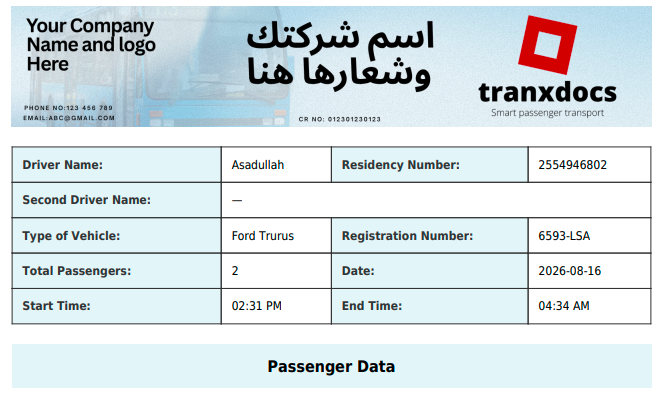
Driver details, vehicle info, all passenger names with passport/iqama numbers, nationalities, and from/to locations — all in one professional PDF page.
Agreement Contract
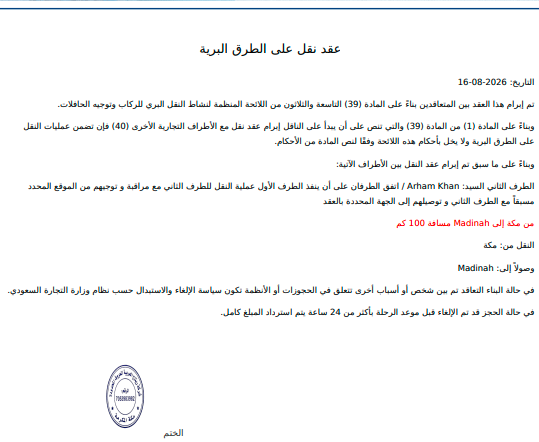
Automatic Arabic land transport agreement based on Saudi regulations — with your company stamp and signature, ready to sign immediately.
QR Code Access
Every PDF includes a scannable QR code. Checkpoint officers, clients, and supervisors can scan with any smartphone — no app or login required.
Logging In
Access Tranxdocs from any modern browser on any device — no app installation required.
Any Browser
Chrome, Firefox, Safari, Edge — all supported. Works perfectly on desktop, laptop, tablet, and mobile phone.
Secure Access
Only authorized users can log in. QR code links on PDFs are public (for checkpoint scanning) but cannot access any management features without credentials.
Filling a Trip Form
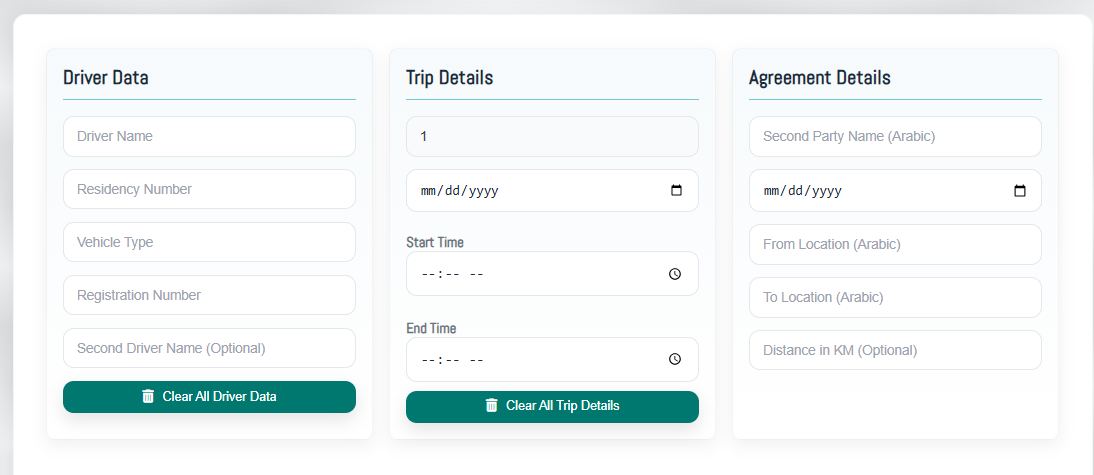
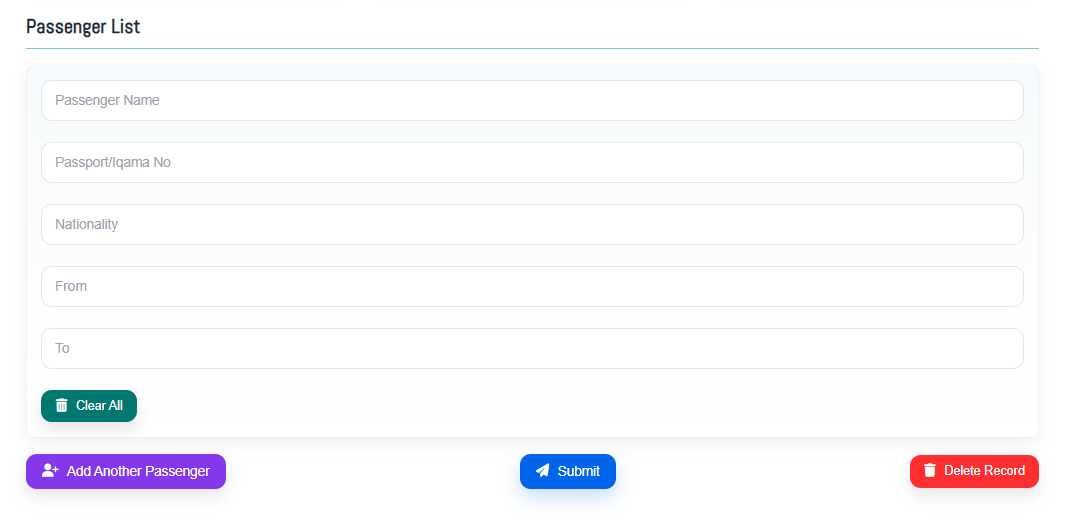
The main form is divided into three sections plus a passenger table. Complete all sections and click Save.
Driver Data Left Panel
Enter driver name, Iqama (residency) number, vehicle type (e.g. Hyundai Starex), and registration number. Optionally add a second driver name.
Trip Details Center Panel
Enter total number of passengers, trip date, departure start time, and end time.
Agreement Details Right Panel
Enter the second party name (in Arabic), agreement date, departure city, destination city, and distance in kilometers.
Passenger Table Below Form
Add each passenger's full name, passport or Iqama number, nationality, departure city, and destination. Click Add Passenger to add more rows.
Save
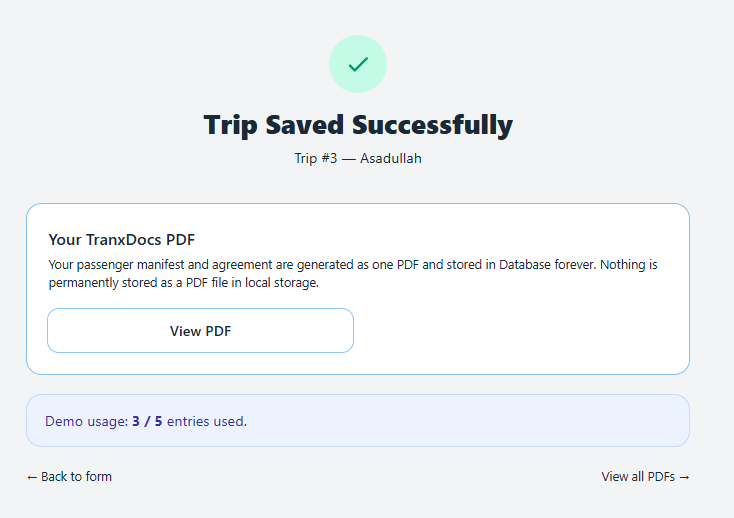
Click the Save button. Tranxdocs saves all data instantly and redirects you to the PDF page for this trip.
Autocomplete
Tranxdocs remembers every driver you've entered. Start typing a name and their full details auto-fill — saving minutes per trip.
How It Works
Begin typing in the Driver Name field. Tranxdocs searches all previous records and shows matching drivers as suggestions. Select one and all their details (vehicle, Iqama number, etc.) fill in automatically.
Time Saved
For repeat drivers — which is most trips — data entry drops from 5 minutes to under 60 seconds. Just update the date, passengers, and save.
PDF Generation
Every trip generates a merged PDF containing both the Passenger Manifest and the Arabic Agreement Contract — with your company's official branding, stamp, and signature.
View PDF
Opens the complete merged PDF directly in your browser — no download needed. Available from the Success page, PDF List, and Vehicle Folders.
Download PDF
Saves the PDF file to your device immediately. Available everywhere you can View a PDF.
Zero Storage Used
Tranxdocs never stores PDF files on the server. Every View or Download generates the PDF fresh from the database in real time.
QR Code
Every Passenger Manifest PDF includes a unique QR code that links to that trip's report page — scannable by anyone, anywhere, on any device.
Who Can Scan
Anyone with a smartphone — checkpoint officers, clients, company supervisors, or auditors. No app installation needed, just the phone camera.
What They See
The full trip report page with passenger details and View/Download PDF buttons. No access to any other part of Tranxdocs without login credentials.
View PDFs
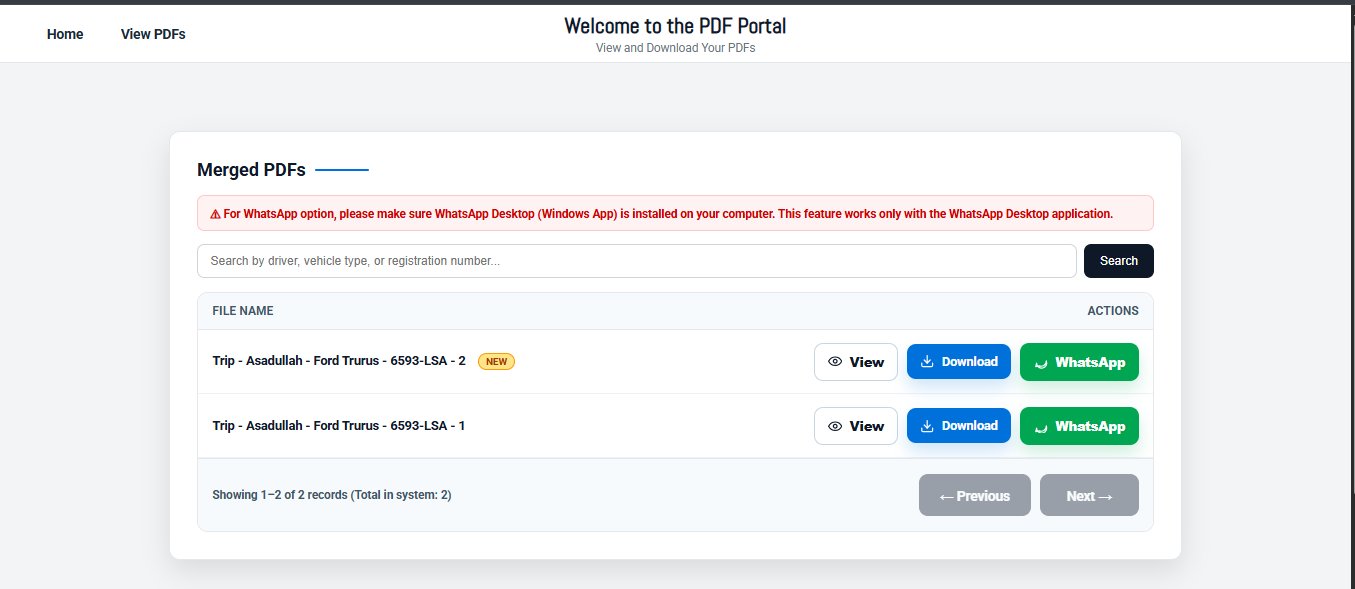
A searchable, paginated list of every trip record in the system — newest first. Access from the navigation menu.
Search
Type a driver name, vehicle type, or registration number in the search box. Results filter instantly across the entire database.
View / Download / Share
Each record shows View (browser), Download (file), and WhatsApp (share link via WhatsApp Desktop) buttons.
Pagination
Records shown 20 per page. Use Previous and Next buttons at the bottom to navigate through all records.
Vehicle Folders
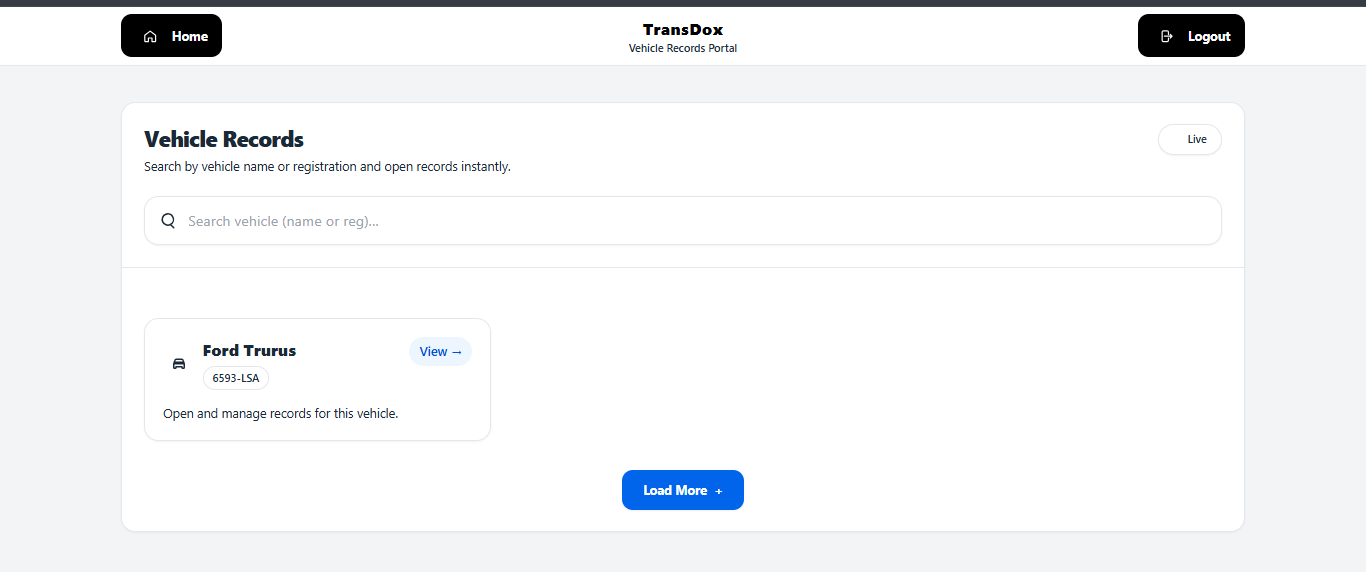
Browse all trip records organized by vehicle registration number. Apply date filters and download individual or bulk PDFs as ZIP files.
Browse by Vehicle
Click any vehicle to see every trip it has been used for. Records are sorted by date, newest first.
Date Filter
Narrow results to a specific date range (e.g. this month, last week, a specific date). From and To fields accept any date.
Bulk Download
Download all filtered trips as a ZIP file with one click. Or select specific trips and download only those — perfect for audits.
Monthly Report
Tranxdocs automatically packages all PDF records from the month and emails them to your admin address — every month, on time, without any manual action.
Automatic (End of Month)
On the last day of every month, Tranxdocs automatically collects all trips where PDFs were generated, creates a ZIP package, and emails it to your configured address.
Manual (On Demand)
Go to Monthly Report in the navigation. Select any month, enter any email address, and click Send Now to trigger immediately.
Deployment Guide
One-time setup by your administrator. Once configured, Tranxdocs runs fully automatically.
| Step | Action | Where | Status |
|---|---|---|---|
| 1 | Upload Tranxdocs files to server | cPanel File Manager | One time |
| 2 | Create MySQL database + user | cPanel → MySQL Databases | One time |
| 3 | Configure .env file |
cPanel Terminal | One time |
| 4 | php artisan key:generate |
cPanel Terminal | One time |
| 5 | php artisan migrate --force |
cPanel Terminal | One time |
| 6 | php artisan optimize:clear |
cPanel Terminal | One time |
| 7 | Add 2 Cron Jobs | cPanel → Cron Jobs | One time |
| 8 | Upload company logo, stamp, signature | public/images/ folder | Per client |
| 9 | Update company details in database | phpMyAdmin → companies table | Per client |
Username:
demo Password: TransDoxDemo@2026!Change these in
routes/web.php after first login.
Key Benefits
Everything Tranxdocs does — and why it matters for your transport business.
Zero Disk Usage for PDFs
PDFs are never stored on the server. Generated fresh every time from the database. Your server storage stays free — forever, no matter how many thousands of trips you record.
Autocomplete = 60 Second Trips
Repeat drivers (which is most trips) fill in automatically. Data entry that took 5+ minutes now takes under 60 seconds. Multiply that across hundreds of trips per month.
Search 100,000+ Records Instantly
Find any trip from your entire history in under a second — by driver name, vehicle type, or registration number. Built to handle high-volume operations.
Never Miss a Monthly Report
Automatic end-of-month PDF package, delivered to your email every single month without fail. No manual work, no forgetting, always on time.